Your SBOM Is Fan Fiction

Founding engineer at yeet, working on kernel-side observability and the tooling around it. I write about eBPF, Linux internals, and why your telemetry bill looks the way it does.
Somewhere in your CI pipeline there is a step that produces a Software Bill of Materials. It reads your lockfile, container layers, and emits a deeply serious JSON document with a schema version in it, and everyone nods and agrees this is "Good Security Hygiene".
It is also fiction. Well-researched, beautifully formatted fiction about a machine that does not exist.

The machine has software running on it that someone installed by hand in
2023 and then quit the company. It has nginx still clutching the old
libssl.so.3 in memory like a raccoon with a bagel, because you upgraded the
package and nobody restarted anything. It has a plugin that got dlopened at
startup and appears in no manifest on Earth. Your SBOM knows about none of
this, because your SBOM was written before the machine booted, by a tool that
has never met the machine.

So we stopped asking the build and asked the kernel.
TL;DR
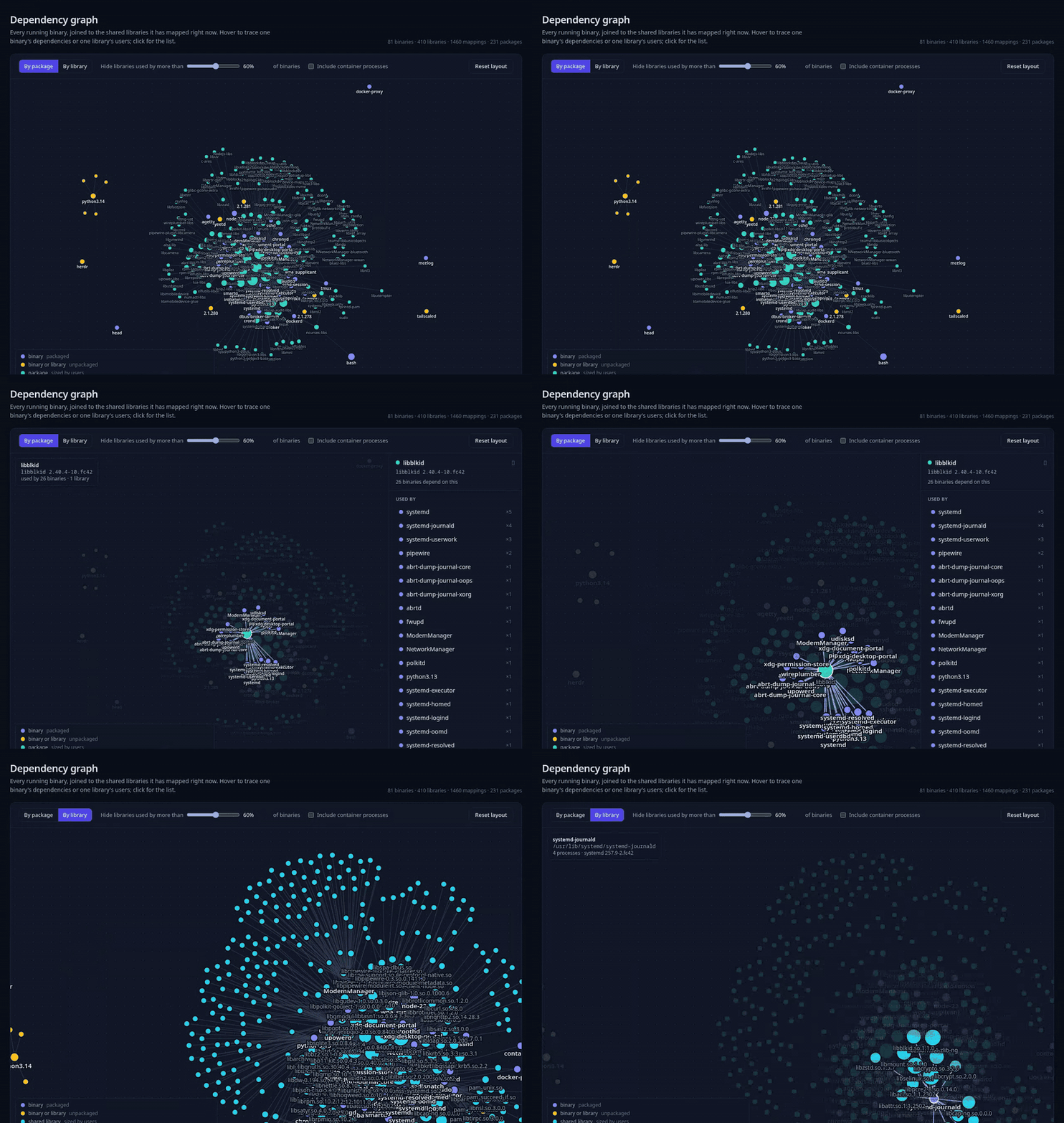
We built a runtime bill of materials on yeet to answer these question:
- What is actually running on this host right now
- Which shared objects each process has mapped into memory
- Who is listening on what connections
Then we smacked CVE correlation on top and gathered the results of this onto three machines we're actually using and frankly were not emotionally prepared for the results.
You'll learn:
- How
/prochas contained your dependency graph this entire time, and how yeet'ssys_graphhands it over as GraphQL so you never write the parser. - Why the yeet isolate refusing to
fetchis the best thing about it. - Why the
/procwalk runs in aWorker, and what the runtime's message cap taught us. - How
yeet serviceturned one page into a fleet view with zero new servers. - How
yeet:symturns "openssl is installed" into "that function is in memory in these processes.
The whole thing is open source. To view the source or run it on your own boxes, grab it here:
Ok but like, isn't that just ldd?

No. ldd tells you what a binary would load if you ran it on this
machine, today, with a clean environment and a full night's sleep. We want
what a process did load, which is a different question with a different
answer more often than anyone likes to admit.
The kernel keeps receipts. For every live pid:
/proc/<pid>/exe      what is actually running
/proc/<pid>/maps     every file mmap'd into it, .so or otherwise
/proc/<pid>/fd       its sockets, by inode
/proc/net/tcp        those same inodes, with addresses and ports
/proc/<pid>/cgroup   which container it believes it lives in
That's the whole BOM. It has been sitting there in a fake filesystem, since before you were hired.

The problem was never the data. The problem is that nobody wants to write the parser. It needs root and has to race processes exiting mid-read. Every file has its own little parsing dialect and the dialect drifts between kernels. You write it, it works on your laptop, it explodes on the CI runner, you start drinking at lunch.
Luckily, with yeet you write it once. sys_graph is a GraphQL schema over /proc (and docker,
and network tables and a ton of other stuff) that a yeet isolate queries from
JavaScript. The whole thing is one call:
const { data } = await yeet.graph.query(`{
  procs {
    pid exe cmdline
    maps { kind path }
    fds  { inode kind }
    cgroups { pathname }
  }
  tcp { inode local_address { addr } remote_address { addr } }
}`);
That's the full parser.
pauses for applause
Every entry in maps that contains .so is a library file that our process mapped into memory.
Any file a process still has mapped after they were deleted from disk come back with a (deleted) suffix, which is the
you patched openssl three weeks ago but never fucking restarted anything
email you'll get from security. We didn't have to write code for that. It fell out of the query like change from a couch.
yeet.graph.query resolves when the daemon has walked /proc and hands back
JSON.
tl;dr: the kernel already has your SBOM. yeet just picks up the phone.
The walk happens somewhere else
In complex systems having potentially hundreds or even thousands of processes, the
process of walking the filesystem to find every mapped file is a couple hundred KB of
JSON coming back from the daemon. Not too bad, but the isolate that serves the page shouldn't
need to worry about falling behind on rendering because systemd has 400 maps.
So the walk doesn't run in the page's isolate. It runs in a Worker:
Yup, just like the browser, yeet isolates have a Worker global. What's that old saying
about imitation being the highest form of flattery?
const w = new Worker("./scan-worker.js");   // a second isolate, same `yeet` global
w.onmessage = ({ data }) => {
  if (data.progress) setProgress(data.progress);   // "reading memory maps"
  else if (data.chunk != null) collect(data);      // the result, in pieces
};
yeet uses the same postMessage and terminate() APIs as the web. The
difference is what's inside: the worker's global is the yeet global, so
yeet.graph.query works in there exactly as it does in the page. It walks
/proc, sends the folded data back to our main thread, and gets terminated.
The raw map tables die with it and the page isolate never blocked.
The isolate is limited by design
The yeet isolate cannot make a network request. It cannot open a file. It
cannot exec anything. Its globals are graph, bpf, sym, ai, alert
and a short list of friends.
Think about what that means for a scanner. The usual security tool is a
40 MB Go binary with a net/http import, running as root, that you hope
only phones home to the place on the tin. A yeet isolate is a sandbox that
physically lacks the hands to phone anyone. Not "we audited it and it
doesn't". It can't. The worst thing a bug in our scanner can do is produce
a wrong graph or call HTML a programming language (ok maybe not that).
One does not simply fetch from an isolate.

But a BOM does need two things a kernel view can't give you: who owns this
file, at what version, and what's its hash. Those need rpm, or dpkg's
database, and a sha256 over the bytes on disk.
This is what yeetkit is for. You mark
a function "use server" and it runs in Node on the host instead of in the
isolate. That's the airlock. Every capability the scanner has beyond reading
the kernel is a named function you can point at in one file, and the list
for this app is short:
enrich({ paths, hash })   // rpm -qa / dpkg file lists → owner + version; sha256 the binaries
advisories({ packages })  // dnf updateinfo on Fedora, OSV elsewhere
hostIdentity()            // hostname, distro, for the report header
Three functions. That is the complete inventory of "things this security
tool is allowed to do on your box that aren't reading /proc".
What comes back through the airlock is a row that says: **this running process maps a library with an open high-severity advisory.
The CI runner came back with twelve of those. 🫣
Drawing it without melting a browser tab
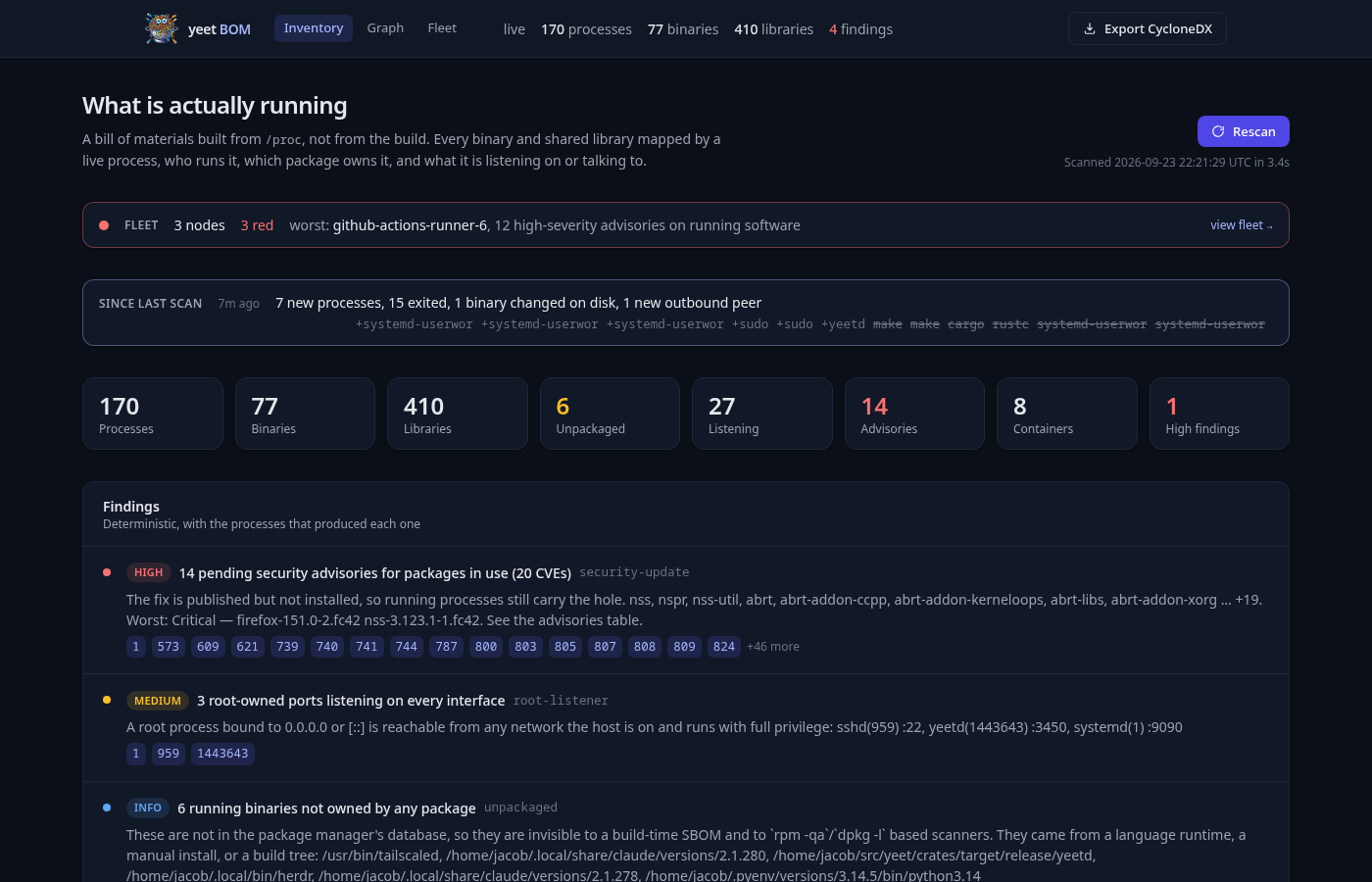
A few hundred binaries, a few thousand edges. The isolate folds the inventory into nodes and links at two zoom levels, one node per library file or one per owning package, and hands both to the browser in one go. d3-force does the layout. Layout happens where the pixels are, and the isolate has better things to do than compute spring physics for your entertainment.
Let's take this puppy for a spin
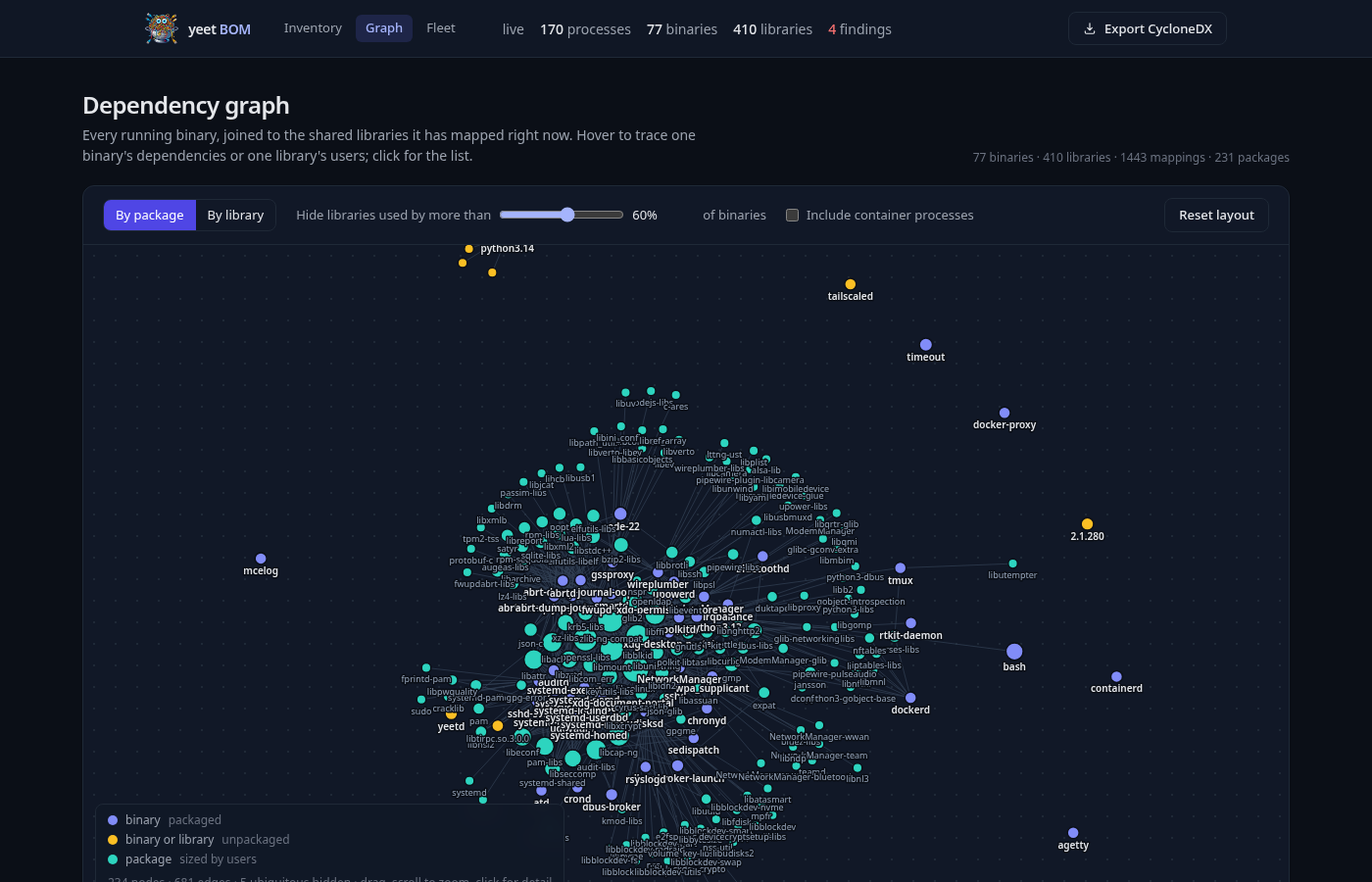
Here's where it stopped being a demo.

yeet service takes a set of units and routes and runs on the daemon. Our node service is one lazy process running the built app.
The hub service is the identical thing with extra upstream routes pointing at each node's gateway.
The hub's gateway publishes a manifest at /.well-known/yeet/manifest.json
that re-roots every upstream route under /nodes/<host>/… and tells you the
via chain that answers it.
flowchart LR
  subgraph stick["stick (hub)"]
    browser["browser :3100"] --> hub["yeetkit hub"]
    hub -- ws --> gw0["gateway :3450"]
  end
  subgraph vm["jacob-vm (node)"]
    gw1["gateway"] --> iso1["isolate"]
  end
  subgraph runner["runner-6 (node)"]
    gw2["gateway"] --> iso2["isolate"]
  end
  gw0 -- "/nodes/jacob-vm/app" --> gw1
  gw0 -- "/nodes/runner-6/app" --> gw2
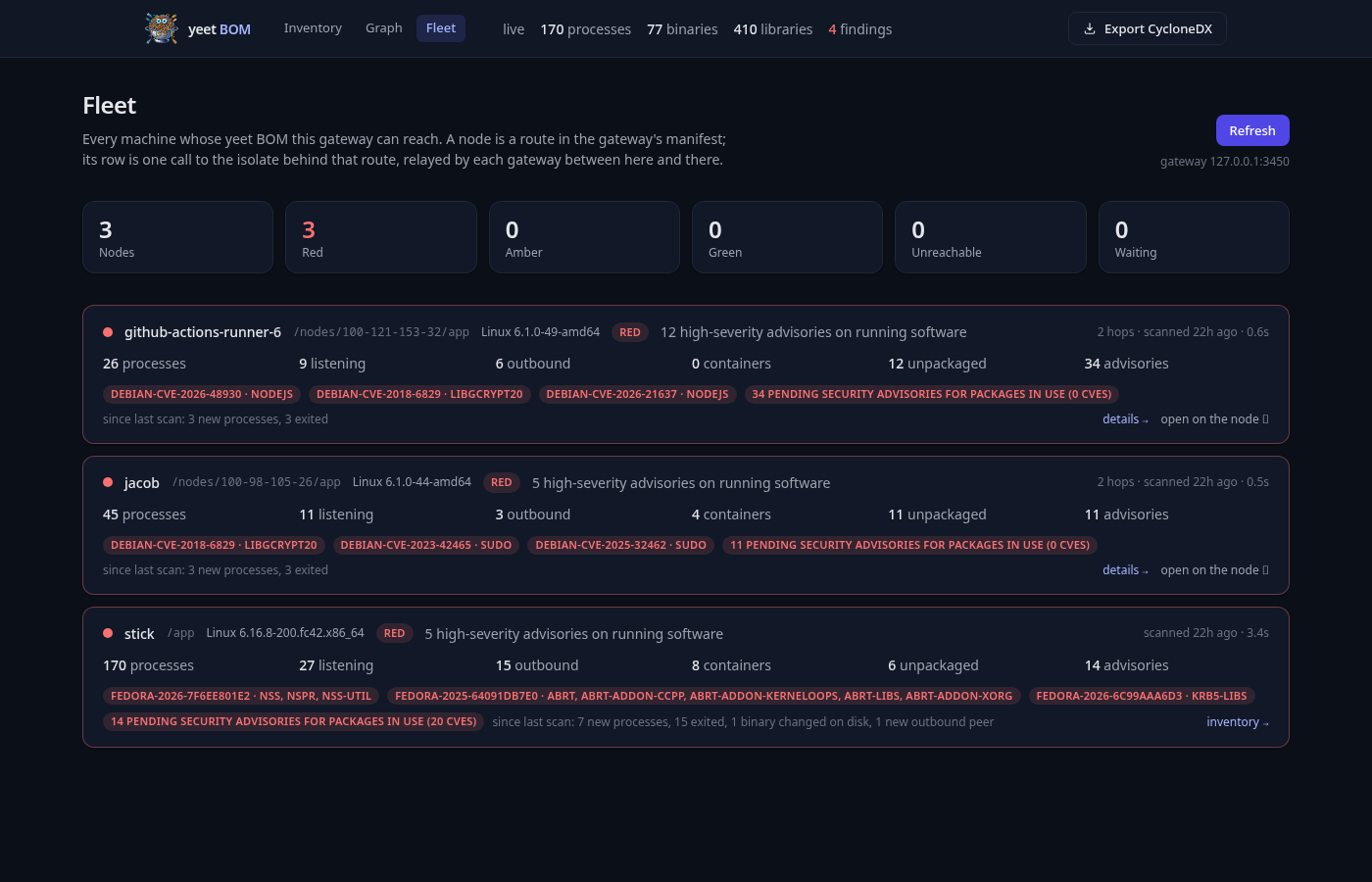
The fleet page on the hub reads that manifest and sends the exact same call frame
the hub uses to talk to its own isolate: "hey, latest inventory?"
Rows land as each node answers, so a node that's down shows as unreachable while the others fill in around it.
Ok but is the vulnerable function actually loaded?
This is the question every advisory raises and no SBOM answers. The feed
says openssl-libs has a fix for something in SSL_select_next_proto. The
inventory says seventeen processes are using libssl.so.3. Is the function
in there?
yeet's yeet:sym module has an Inspector that opens an ELF and gives you
its symbol table:
import { Inspector } from "yeet:sym";

const insp = await Inspector.open("/usr/lib64/libssl.so.3");
const hits = await insp.find(/^SSL_select_next_proto$/);
// [{ name: "SSL_select_next_proto", addr: 0x194d0, size: 126, kind: "function" }]
Twelve milliseconds on a distro libssl, 1,500 symbols. So we do that for every file a live process maps.
An advisory usually names the function in its own text: "NULL pointer dereference if an application calls
gss_accept_sec_context…". So the page reads every pending advisory, pulls the identifiers out of the CVE summary, and checks each one against memory.
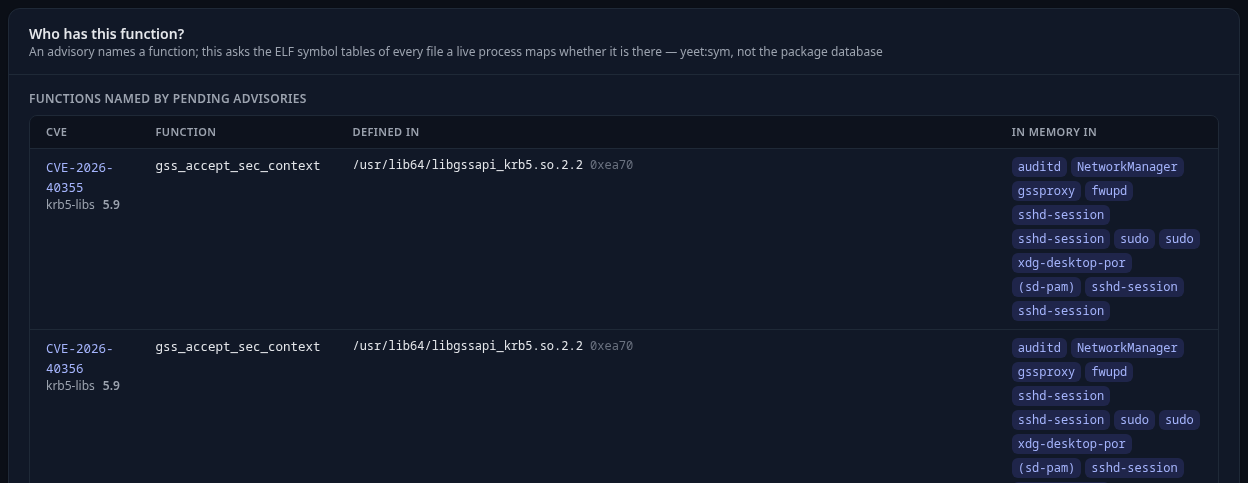
That's the krb5 advisory from the distro feed, the function it names, and the library that defines it.
In this case we can see multiple processes have it mapped.
We can also search for a specific function by name:
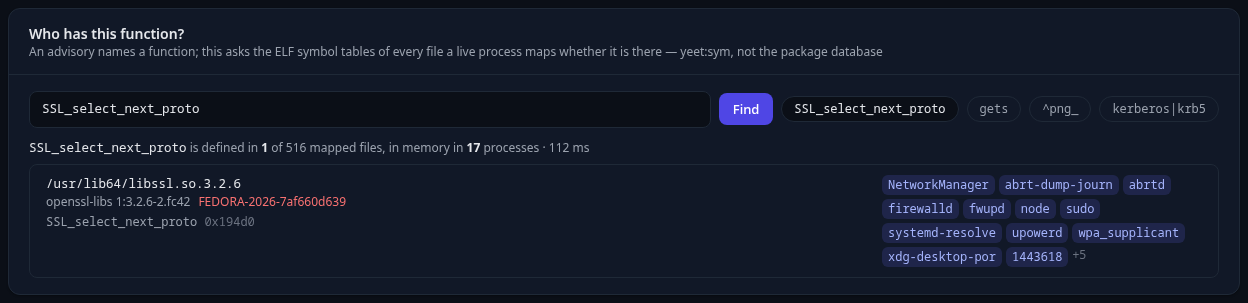
Then we ran it on the Debian nodes and it got better.
jacob-vm  /usr/bin/nsolid                          nsolid 24.13.0
runner-6  /usr/bin/node                            nodejs 22.22.2  (30 open CVEs)
runner-6  /opt/actions_runner/…/node20/bin/node    no package
Node statically links its own OpenSSL. Every one of those binaries has a
private copy of SSL_select_next_proto that rpm, dpkg, and your SBOM
attribute to nothing, because there is no libssl.so in the picture at all.
The one under /opt/actions_runner was dropped there by a GitHub Actions
installer and belongs to no package on the system. The symbol table is the
only place that copy exists on paper.
The automatic list on the runner came back with 16 named functions, 6 of
them in memory, including nghttp2_session_mem_send inside those same
node binaries.
tl;dr: the package database says what was installed. Inspector says what
was compiled in. Those are different lists and the second one is the one
the CVE is about.
The end
Your SBOM is still fan fiction. That's fine. It's useful fan fiction and the build pipeline should keep writing it, the way you should keep writing unit tests for code that will meet production and immediately do something else.
But when someone asks "is the vulnerable openssl actually loaded anywhere",
the answer is not in a JSON file from last Tuesday. It's in /proc, and yeet will read it to you from anywhere in the system.

To view the source code or run the tool yourself, you can find it all in bomtastic.