Claude Code on Omarchy

Fifteen years building engineering platforms, currently focused on advanced AI infrastructure at yeet. I love turning the deeply complex topics into something everyone can understand. I relate deeply with the core yeet philosophy that you can just build things.
Last updated: September 2026
Quick answer. There is nothing to install. Omarchy ships every major coding-agent CLI as a lazy-loaded mise stub in
~/.local/bin/, so typingclaudefetches and authenticates it on first run, andomarchy default agent claudemakes it the one behindSuper + Shift + Ctrl + A. The part worth your attention is permissions, because Omarchy's own manual says agents launched through its shortcuts "run unattended in their respective don't-stop-to-ask modes, so be ready for them to actually do things!" That is a deliberate, well-documented default and it is the opposite of what you want on a machine holding your keys, so the setup below is mostly about deciding when to override it.
I build kernel-side tooling for Linux and I have watched a lot of people wire agents into machines they care about. What I keep seeing on agent-first setups is that the install is five seconds and the permission decision never gets made at all, because nothing forces it. Let's dig in.
How do I install Claude Code on Omarchy?
You do not, and that is the first thing to understand about this distribution: the agents are already wired in and waiting to be woken up. From the Omarchy manual's AI chapter:
"Omarchy treats AI coding agents as first-class citizens, but it doesn't pick a favorite for you. Instead, every major coding-agent CLI comes pre-wired as a lazy-loaded launcher. The launchers are tiny mise-managed stubs in
~/.local/bin/, so nothing is downloaded until the first time you actually run one."
So the install is running the command, and the first run is where the download and the authentication both happen:
claude
That fetches Claude Code through mise and prompts you to authenticate. Thirteen agents ship the same way, including codex, opencode, copilot, crush, grok, pi, omp, ori, hermes, muse and cursor-agent. To wrap another CLI the same way, omarchy-mise-install <package> [command-name], and omarchy update keeps the stubs current alongside everything else mise manages.
The consequence worth drawing out: a machine with thirteen pre-wired agent launchers has thirteen paths to the same filesystem, and a permission decision you make for one of them is not a decision you made for the rest. Each agent keeps its own configuration in its own dotfiles, so tightening Claude Code's settings leaves codex, opencode and the other eleven exactly as they shipped.
How do I set Claude Code as the default agent on Omarchy?
One command, or the menu, and the choice wires it into several places at once rather than only setting a preference. Knowing what it touches is worth a minute before you run it:
omarchy default agent claude
The same thing lives under Setup > Defaults > Agent in the Omarchy Menu (Super + Space), and if the agent is not installed yet, picking it installs it first, so the menu route collapses installation and selection into one step. A fresh install invites you to choose with a one-time notification rather than picking for you.
Choosing Claude specifically does something extra that is worth knowing before you run it. The manual says it "also attempts to set up its browser extension for Chromium, Chrome, Brave, Brave Origin, and Edge", that the setup "applies to all users and may ask for your system password", and that a cancelled or failed extension install still selects and launches Claude. Firefox and Zen do not support the extension. Run /chrome inside Claude to check the connection.
Once it is the default, Super + Shift + Ctrl + A launches it in a dedicated terminal window, and omarchy agent prompt "Review this project" launches it straight into a task. There are terminal shortcuts too: a runs the default agent inline, and c, cx and cy start OpenCode, Claude Code and Codex directly.
How do I install a plugin on Omarchy?
omarchy plugin add <git url>, and the reason to do it early is that the install flow tells you something about the machine that the agent sections above cannot. Omarchy's desktop is one long-lived Quickshell process called omarchy-shell, and the shell plugins chapter is blunt about what adding to it costs:
"Before it does anything, it tells you plainly that plugins run as arbitrary, unsandboxed code inside your long-lived shell process, shows you the URL, and asks you to confirm. Take that seriously."
Read what the same paragraph then says the installer does not do: "It never runs anything from the plugin, never executes an install hook, and never asks for sudo — it clones files, checks the manifest, and flips a bit over IPC." The trust boundary is not at install time. It is at enable time, and the code runs in your shell process from then on. That is the same shape as the agent decision on this page, stated by the same manual, and it is the reason --enable deserves a beat of thought rather than a reflex.
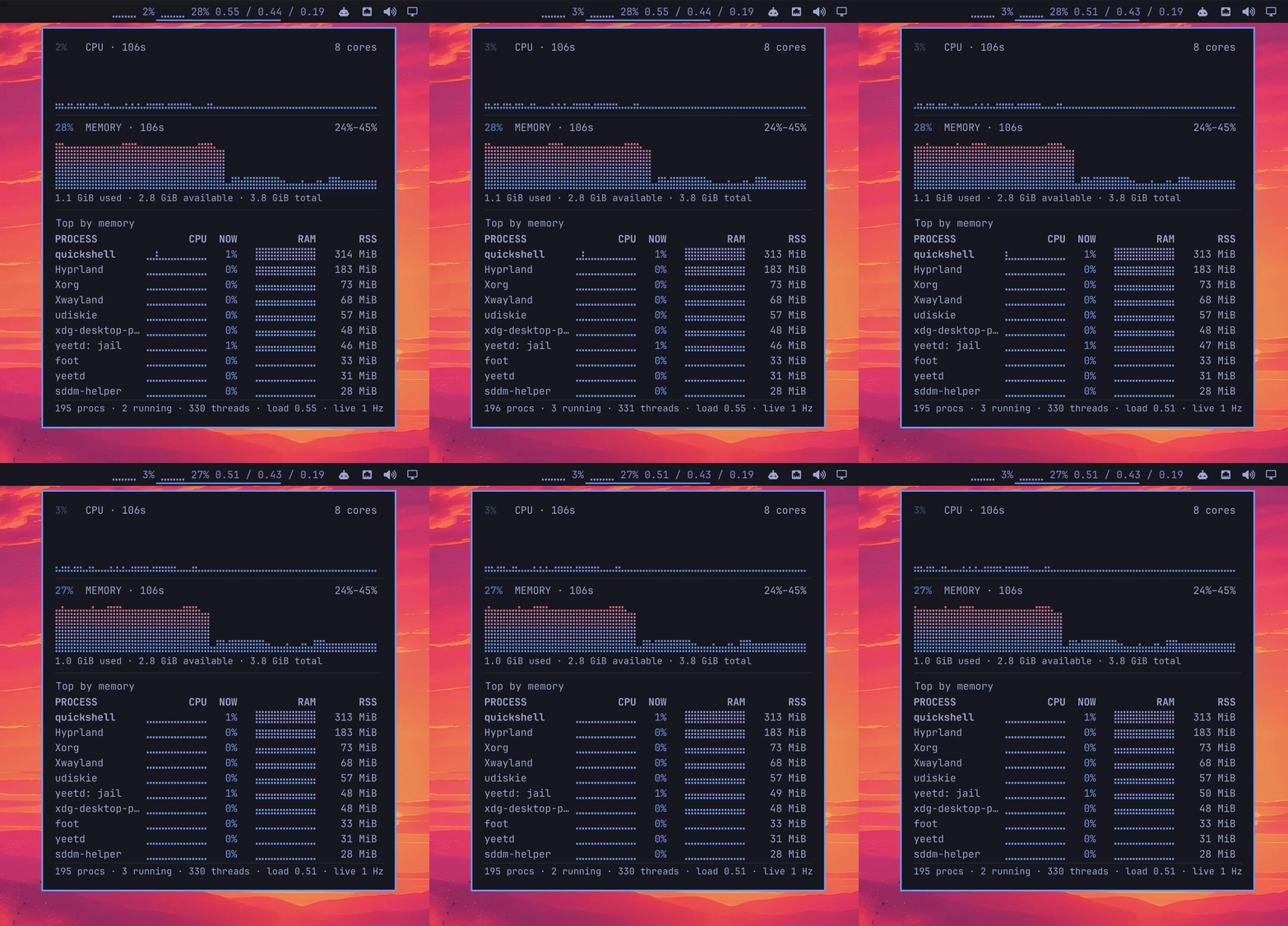
So install one and watch that flow happen. This is proctop, a bar widget that puts live CPU and memory history in the bar itself, which on a tiling desktop is the one surface you cannot forget to check. It is also a fair test of the trust question above, because it is a plugin you have every reason to read before enabling:
omarchy plugin add https://github.com/yeet-src/omarchy-proctop --enable
You can also just point Claude Code at it. Every step here is omarchy CLI surface, which the manual calls "particularly helpful when you're having an AI agent work with you on customization or configuration", and Omarchy symlinks its own agent skill into ~/.claude/skills, so an agent on the box picks it up without setup. Paste this at a claude prompt on the box:
Install the Omarchy plugin at https://github.com/yeet-src/omarchy-proctop.
Clone it with `omarchy plugin add` but do NOT pass --enable. Then show me
what it cloned into ~/.config/omarchy/plugins/cx.yeet.proctop/ and stop so
I can read it before anything loads.
The stop is the part worth keeping, and it is the reason to spell it out rather than just naming the repo. This is the one install where you want to read the code yourself, and an agent running under the auto-approving launchers will pass the confirmation prompt for you without pausing, which is exactly the prompt the manual tells you to take seriously. Once you have read what it cloned, omarchy plugin enable cx.yeet.proctop turns it on.
By hand it is the same two steps. omarchy plugin add without --enable clones the repo, validates the manifest and stops, leaving the checkout on disk with nothing loaded, which is the order worth using any time you install from a URL you have not read yourself:
omarchy plugin list
omarchy plugin enable cx.yeet.proctop
proctop needs yeet installed and logged in, because its samples arrive over yeet.graph.subscribe at 1 Hz rather than from polling, and the per-process list backs off to one sample every four seconds while the panel is shut. Until that is in place the bar item says what is missing:
sh ~/.config/omarchy/plugins/cx.yeet.proctop/install-yeet.sh
yeet login
Clicking the bar item opens a panel with CPU on an absolute 0-100% axis, memory on its own min-max band, and a table of the ten largest processes carrying a CPU sparkline, live CPU share, a memory sparkline and RSS. Colours come from the active Omarchy theme, so it follows whatever you have set. omarchy plugin remove cx.yeet.proctop takes it back off.
For agent work specifically, this is the surface that answers a question a transcript cannot: whether the agent you launched with Super + Shift + Ctrl + A has spawned a build or a test run that is quietly eating the machine. omarchy plugin update fast-forwards the checkout later, showing the diff before it applies and rolling back if the new revision fails validation. Other plugins are catalogued at omarchyplugins.com, which the manual calls the first place to look before writing your own.
Why does the Omarchy manual warn that agents "actually do things"?
Because those launchers start agents with approval prompts turned off, and the manual says so plainly rather than burying it in a configuration reference nobody reads:
"Agents launched this way run unattended in their respective don't-stop-to-ask modes, so be ready for them to actually do things!"
The same sentence pattern covers the terminal shortcuts, which start their agents "again in their auto-approving modes". That is a coherent design choice for a distribution built around agentic work, and it is stated with an exclamation mark rather than hidden in a footnote, which is more than most tools manage.
It is also the single most important fact on this page, because it inverts the default you get from running claude yourself. A bare claude in a terminal starts in Claude Code's own default mode, which asks before acting outside its boundary. Super + Shift + Ctrl + A does not. Two launch paths on the same machine, same agent, opposite safety properties, and nothing on screen distinguishes them afterwards. That is the detail to carry into every other section here, because a habit formed at the hotkey is a different habit from one formed at the prompt.
Omarchy does put one guard rail in: "since agents refuse to remember trust for your home directory, launches from $HOME start in ~/Work instead." That bounds the working directory the session opens in, which prevents the most obvious accident. It does not bound what an auto-approving agent does once it is running there, because a working directory is where the agent starts rather than where it is confined.
Which Claude Code permission mode should I use on Omarchy?
Match the mode to whether a human is watching, and treat the auto-approving launchers as a deliberate exception rather than the baseline. Claude Code ships six modes and three of them matter on a desktop like this one, because the question is not how strict each is but which direction it breaks when the agent meets something you did not anticipate.
| Mode | What runs without asking | Use it on Omarchy for |
|---|---|---|
default (Manual) | Reads only | Anything touching a machine you care about |
plan | Reads, plus classifier-approved commands | Letting an agent explore before it changes anything |
dontAsk | Reads and pre-approved tools; anything that would prompt is denied | Unattended work, because it fails closed |
dontAsk is the one worth knowing about, because it is the only mode that neither stalls nor improvises when nobody is at the keyboard. Anthropic documents it for "CI pipelines or restricted environments where you pre-define what Claude may do", and notes "the session never waits for input". Set it explicitly when you want unattended work, rather than accepting an auto-approving launcher as the way you get there.
The mode is settable per session, which is the right granularity when the same machine does supervised and unsupervised work on the same afternoon:
claude --permission-mode plan
Or pin a default in ~/.claude/settings.json. The deeper control, if you share the machine or manage several, is a managed-settings.json at /etc/claude-code/, which Claude Code "applies above every other level, so no user, project, local, or --settings value overrides them". The full treatment of Claude's permission surface covers which rules survive which modes.
What should I put in a CLAUDE.md on an Omarchy box?
Write down what is on the machine, because Omarchy is an unusual enough environment that an agent will guess wrong about it in ways that look like the agent being bad rather than the context being thin. This is the cheapest reliability work available, it takes about six lines, and almost nobody does it.
Omarchy is Arch with Hyprland, so the package manager is pacman, the compositor is not X11, and a large amount of the system is managed through the omarchy CLI rather than by editing files directly. An agent that assumes apt, assumes X11, or hand-edits a config that omarchy reinstall configs will overwrite is going to waste a session and possibly make a mess.
Three things worth naming in the file, all of which an agent will otherwise infer from a training set rather than from this machine:
- The distro and the compositor. Arch, Hyprland, and the fact that
omarchyis the command for system configuration rather than editing dotfiles by hand. Without this an agent reaches forapt, assumes X11, and hand-edits a file thatomarchy reinstall configswill overwrite. - What is actually installed. Omarchy ships a specific curated set, so an agent reaching for a tool that is not there produces a
command not foundrather than an answer. That class of failure is a measurable share of what agents get wrong on a host, and it is the one a short file fixes outright rather than mitigating. - Which directories are off limits. Pair this with real deny rules rather than relying on it, because a line in a markdown file is context the model weighs against everything else in its context, and a deny rule is a decision made before the tool call runs.
Omarchy also ships its own agent skill, symlinked into ~/.claude/skills among others, for tailoring the system. The manual is candid about it: "you should treat this skill as experimental. Different models will use it to different effect. It's best to run in plan mode first."
Can I see what Claude Code actually did on my Omarchy machine?
Not from its own transcript, which is the gap that matters once you have an agent running in an auto-approving mode. An agent's log records the tool calls its framework mediated, and Anthropic documents the boundary: OTEL_* environment variables are not passed to the subprocesses the Bash tool spawns. One approved Bash call is one event no matter how many processes ran underneath it.
On a distribution where the default launcher does not stop to ask, that boundary is doing more work than usual. The commands you most want a record of are exactly the ones nobody approved individually, and the transcript's granularity is coarsest precisely where the approval step was skipped.
The record has to come from below the agent, which on Linux means the kernel, because it is the one layer the agent's own configuration cannot shape:
curl -fsSL https://yeet.cx | sh
yeet login
yeet run gh:yeet-src/claudefeed
claudefeed streams every command, file open and TCP connection a coding-agent session makes, scoped to that session's process subtree. It finds the live claude processes itself, so there is no pid to supply, which matters on Omarchy where the agent was launched by a hotkey rather than by you in a terminal.
Its documented limits are worth carrying: it records that a file was opened rather than its contents, hooks openat only, and covers TCP connect initiation rather than UDP, so DNS over UDP does not appear. And like its siblings it "observes. It tells you what a session did; it does not stop, hold, or modify anything." For a boundary that refuses rather than reports, agent-lock is the sibling that returns -EPERM on opens outside a directory you name.
Can I watch Claude Code's CPU and memory from the Omarchy bar?
Yes, with the proctop plugin installed above, and on a tiling desktop where the agent runs in its own window the placement is what makes it get looked at. A terminal you have to remember to check is a terminal you stop checking around the third day.
What the bar gives you for agent work is the thing a transcript cannot: an agent that has spawned a build, a test run or something quietly eating the machine shows up as CPU and memory you did not expect, on a surface that is always in view. That is a different question from what a session ran, which is what claudefeed answers above, and the two pair rather than compete. The bar tells you something is happening; the feed tells you what.
The pairing matters most under the auto-approving launchers. A Super + Shift + Ctrl + A session does not stop to ask before it starts something expensive, so the first signal you get is load, not a prompt. Seeing the load is what sends you to the feed.
Should I let Omarchy hand crash dumps to Claude?
It is one of the better agent workflows on the system, and it is worth understanding what it hands over. Omarchy watches systemd-coredump, and when something segfaults you get a notification; clicking it passes the crash to your default agent along with Omarchy's diagnose-crash skill. You can also run it by hand:
omarchy agent crash <pid>
That is a genuinely good use of an agent, because reading a core dump is exactly the kind of tedious, well-specified work models are good at. The thing to be deliberate about is that a core dump is a memory image, and a memory image of a crashed process can contain whatever that process was holding, including tokens and secrets. Handing it to an agent means handing it to whichever model that agent is configured against.
If that matters for a given program, omarchy toggle crash-capture turns the watching off entirely, and omarchy crash mute <program> silences one program at a time while leaving the rest reporting normally. The per-program form is usually the right one, since the workflow is genuinely useful and only a handful of processes on a machine hold anything worth worrying about.
How do I audit Claude Code on Omarchy when several agents are installed?
Scope the record to a process tree rather than to a user, because thirteen pre-wired launchers running as one uid are indistinguishable to Linux's ownership checks. A machine where you have tried claude, codex and opencode has three agents with identical permissions and no way to tell their actions apart from the filesystem alone. That is not an Omarchy quirk; it is the Unix permission model meeting a workload it was never designed for, and it shows up here earlier than elsewhere because the distribution makes trying all three so easy.
claudefeed scopes by matching the session's process subtree, which is the right shape for this: run it while one agent works and you see that agent. For the narrower question of what ran and how often, rather than what a session touched, exectop folds a tree's commands into one row per kind:
yeet run gh:yeet-src/exectop -- --pid $(pgrep -n claude)
Attaching to a running pid cannot see children forked before you attached, which the tool states rather than papering over, so start it before the session rather than after something looks wrong. On a hotkey-launched agent that means starting the probe first and the agent second, which is a habit worth forming early. The layer-by-layer comparison of agent tooling covers what each option enforces or records.
The bottom line: the install is free, so spend the time on permissions
Treat Omarchy's agent integration as the good default it is and make one deliberate decision it does not make for you. Installing Claude Code is typing claude, and omarchy default agent claude wires it into Super + Shift + Ctrl + A and the terminal shortcuts. Then read the manual's own warning, because those launchers start agents in "don't-stop-to-ask modes" and a bare claude in a terminal does not, which means the same agent on the same box has two different safety properties depending on how you started it. Set dontAsk explicitly for unattended work so it fails closed, use plan when you want an agent to explore first, and put credential paths in deny rules rather than in a CLAUDE.md, because a markdown file is a preference. Write down the distro, the compositor and what is installed, which is aimed at the largest measured category of agent failure. And keep a record the agent did not write, which is claudefeed on yeet when you want one session's commands, files and connections in a single feed.
The mistake worth avoiding on an agent-first distribution is assuming the defaults encode a permission decision somebody made for you. They encode a workflow decision, stated openly, optimised for getting work done. The permission decision is still yours, and the machine will not prompt you to make it.
Frequently asked questions
Does Omarchy come with Claude Code pre-installed?
It comes pre-wired rather than pre-installed, which is a meaningful difference on a fresh machine. Omarchy ships tiny mise-managed launcher stubs in ~/.local/bin/ for every major coding-agent CLI, and nothing is downloaded until the first time you run one. Typing claude fetches Claude Code and prompts you to authenticate.
How do I change the default AI agent on Omarchy?
Run omarchy default agent <name>, or use Setup > Defaults > Agent in the Omarchy Menu at Super + Space. If the agent is not installed, picking it installs it first. The default is what Super + Shift + Ctrl + A launches and what omarchy agent prompt uses.
Do Omarchy's agent shortcuts skip permission prompts?
Yes, and the manual says so: agents launched that way "run unattended in their respective don't-stop-to-ask modes", and the terminal shortcuts start agents "in their auto-approving modes". Running claude directly in a terminal starts in Claude Code's own default mode instead, which asks before acting outside its boundary.
Can an admin lock Claude Code's permission mode on a shared Omarchy machine?
Yes, with a managed-settings.json at /etc/claude-code/, which Claude Code applies above every other level so no user, project, local or --settings value overrides it. That is the difference between a preference a developer can edit and a policy they cannot, and it matters on a shared or managed machine rather than a personal laptop.
Why do agents on Omarchy start in ~/Work instead of my home directory?
Because agents refuse to remember trust for a home directory, so Omarchy redirects launches from $HOME into ~/Work rather than refusing to start. That bounds the working directory the agent starts in, which is a real improvement over launching in a directory full of dotfiles. It does not bound what an auto-approving agent does once it is running there.
Does proctop need root on Omarchy?
No, but it needs yeet installed with yeetd running and yeet login completed, since the privileged work happens in the daemon rather than in the plugin. The plugin itself runs one isolate under script and talks to it over that process's stdin and stdout, so there is no port to open and nothing listening.
What is in a core dump that an agent would read?
Whatever the process had in memory when it died, which is the point of the format and the reason to think before handing one over. That includes tokens, decrypted secrets, session cookies and buffered user data, none of which the crashing program had any reason to clear first. For most programs that is unremarkable; for a browser, a password manager or anything holding a production credential it is worth muting with omarchy crash mute <program>.
Does Omarchy log what its agents do?
Not as a distribution feature. Omarchy tracks agent token usage in its agents panel, which answers a billing question rather than an audit one, and the agents themselves record the tool calls their frameworks mediated. Neither produces a record of the processes underneath, which has to come from the host.
Can I run several coding agents on one Omarchy machine?
Yes, and thirteen come pre-wired, so trying several is the expected workflow rather than an unusual one. The thing to plan for is that they all run as your user with identical permissions, so Linux's ownership checks cannot tell their actions apart. Attribution has to come from process-tree scoping rather than from file ownership.
Should I use the Omarchy agent skill for system configuration?
Carefully, and the manual agrees: it says to treat the skill as experimental, that different models will use it to different effect, and that it is best to run in plan mode first. It also suggests being ready to roll back, including with omarchy reinstall configs if the agent makes a mess.
What should go in CLAUDE.md on an Arch and Hyprland system?
The distro and compositor, so the agent reaches for pacman rather than apt and does not assume X11, the fact that omarchy is the configuration interface rather than hand-edited dotfiles, and which tools are actually installed. Environment-knowledge gaps are a large measured share of what agents get wrong on a host.
Sources
- The Omarchy manual, AI chapter. The authoritative source for everything Omarchy-specific here: the mise-managed launcher stubs in
~/.local/bin/, the thirteen pre-wired agent commands,omarchy default agent, the Claude browser-extension setup, theSuper + Shift + Ctrl + Aanda/c/cx/cyshortcuts, the verbatim warning that launched agents "run unattended in their respective don't-stop-to-ask modes", the$HOMEto~/Workredirect, the crash-diagnosis flow, and the manual's own advice to treat the Omarchy skill as experimental. - The Omarchy manual, CLI chapter. The
omarchycommand surface used above, and the note that the CLI is "particularly helpful when you're having an AI agent work with you on customization or configuration". - Claude Code permission modes. Source for the mode table, for
dontAskdenying "every tool call that would otherwise prompt you" and being documented for "CI pipelines or restricted environments", and for what each mode runs without asking. - Deploy managed settings. Source for the precedence rule quoted above, that managed settings apply above every other level so no user, project, local or
--settingsvalue overrides them. - proctop for Omarchy. The bar plugin described above: braille CPU and memory history with a per-process table, installed through
omarchy plugin add, sampling overyeet.graph.subscribeat 1 Hz and backing off to one sample every four seconds while the panel is closed. Requires yeet onPATHwithyeetdrunning. - The Omarchy manual, shell plugins chapter. Source for the plugin model and the install flow used above: the desktop is one Quickshell process called
omarchy-shell, third-party plugins live in~/.config/omarchy/plugins/and receive a limited interface scoped to their own service and lifecycle rather than the trusted interfaces built-ins get, the verbatim warning that plugins "run as arbitrary, unsandboxed code inside your long-lived shell process", the matching statement thatomarchy plugin add"never runs anything from the plugin, never executes an install hook, and never asks for sudo", the--enableprompt you can decline so you read the code first,omarchy plugin list,enable,update(diff shown, rollback on failed validation) andremove, and omarchyplugins.com as the community directory. - claudefeed. The agent audit feed used above. Source for the subtree scoping, the self-discovery of live sessions, and its stated gaps: paths rather than payloads,
openatonly, and TCP connect initiation with UDP unhooked. - exectop. The process-launch monitor for the narrower question of what ran and how often, and the source for the attach-mode gap on children forked before attachment.
- agent-lock. The enforcement sibling, a BPF LSM program on
lsm/file_openreturning-EPERMfor paths outside a named directory. - yeet documentation. The runtime the kernel-side tools here are written in.
Related resources
- How Do I Let Claude Investigate Production on Linux?. Claude's permission surface in full
- Best AI Agent Tools for DevOps on Linux. Nine tools compared on what each enforces or records
- How to Audit What an AI Coding Agent Actually Ran on Linux. Where the agent's own record stops
- How Do I Sandbox Codex on Linux?. The same question for the other pre-wired agent
- How to Sandbox an AI Coding Agent on Linux. Where each confinement boundary holds
Built with yeet, a JS runtime for writing eBPF programs on Linux machines. Join us on discord.