How to Make an Omarchy Plugin

Fifteen years building engineering platforms, currently focused on advanced AI infrastructure at yeet. I love turning the deeply complex topics into something everyone can understand. I relate deeply with the core yeet philosophy that you can just build things.
Last updated: September 2026
Quick answer. An Omarchy plugin is a git repository with a
manifest.jsonat its root and one or more QML entry points. To make one: create the repo, write amanifest.jsondeclaringschemaVersion: 1, a reverse-DNSid, aname, aversion, thekindsit provides (such asbar-widget), and anentryPointsobject pointing at the QML file for each kind. Check it withomarchy plugin validate ./my-plugin, which runs the exact checks the shell runs at load time. Install it from any git URL withomarchy plugin add <url> --enable, which clones it to~/.config/omarchy/plugins/<id>/without running anything from the plugin. Publish it by pushing to a public repo and listing it at omarchyplugins.com. The one thing to know before you start: a plugin "run[s] as arbitrary, unsandboxed code inside your long-lived shell process," so treat it like code you are trusting your desktop to.
Omarchy's desktop is a single long-lived process, a Quickshell instance called omarchy-shell, and almost everything on screen is a plugin inside it: the bar, the drop-down panels, the emoji picker, the lock screen. Making a plugin means adding a component to that process, and the interface for doing it is small enough to learn in one sitting. The manual is blunt about what a plugin is: "A third-party plugin is just a git repo with a manifest.json at its root." Everything else is detail on that sentence.
This walks through building one from an empty directory to an installed, shareable plugin, using a real bar widget as the worked example. The QML that draws your widget is its own craft and out of scope here; the focus is the plugin contract, the part every Omarchy plugin shares regardless of what it draws.
What is an Omarchy plugin, and what files does it need?
A directory with a manifest.json and at least one QML file, tracked in git. That is the whole requirement, and the manual states the minimum directly: "A plugin is a directory with a manifest.json and some QML." There is no build step required, no install script, and no framework you must adopt. The shell discovers your plugin at startup, reads the manifest, and loads the entry point it names.
A working bar-widget plugin, the omarchy-proctop example used throughout this post, has this at its root:
manifest.json      # the plugin contract: id, kinds, entry points
BarWidget.qml      # the component the bar drops in
Panel.qml          # the drop-down panel it opens
app.js             # optional: a background script for live data
README.md
LICENSE
Only the first two are required, manifest.json and one QML entry point. The rest are additions: a second QML file for a panel, an app.js for a data source, a README for the humans. Absent from that list is anything that runs at install time. Omarchy never executes an install hook, so a plugin cannot set itself up by running code on the machine, which is the security property the next sections build on.
What goes in an Omarchy plugin manifest.json?
Six fields the shell requires, plus a per-kind block for whatever your plugin provides. The manual lists the required set precisely: the manifest "declares schemaVersion: 1, an id, name, version, one or more kinds, and an entryPoints object pointing at the QML file for each kind." Here is the manifest from the proctop example, which is a complete, valid bar-widget manifest you can adapt field for field:
{
  "schemaVersion": 1,
  "id": "cx.yeet.proctop",
  "name": "proctop",
  "version": "0.1.0",
  "author": "yeet",
  "license": "Apache-2.0",
  "description": "Live CPU and memory history in the Omarchy bar, with a per-process table.",
  "kinds": ["bar-widget"],
  "entryPoints": {
    "barWidget": "BarWidget.qml"
  },
  "barWidget": {
    "displayName": "proctop",
    "category": "System",
    "allowMultiple": false,
    "defaultSection": "right"
  }
}
The id is the field that matters most, because it is your plugin's permanent identity and it is namespaced. Use reverse-DNS, cx.yeet.proctop here, because ids must be unique across every plugin a user has installed and the omarchy. prefix is reserved for built-ins, so a third-party plugin "can never claim it." Pick an id you control the domain of and do not change it later; it is how the shell tracks enabled state and how remove finds your plugin.
The barWidget block is the per-kind configuration for a bar widget specifically. displayName and category are how it shows up in the plugin picker, defaultSection suggests where on the bar it lands (left, center or right), and allowMultiple says whether it makes sense to have more than one, which the manual notes is false for most widgets and true for spacers and indicators. A plugin can declare several kinds at once and add a block for each; the media plugin, for instance, is both a service and a bar-widget.
What kinds of Omarchy plugin can I make?
The kinds array is what your plugin is, and it decides which entry point the shell looks for. A bar-widget is "a component the active bar can drop into a section," which is the most common thing people build and the one this post uses. Other kinds cover the panels that drop from the bar, the fullscreen overlays, and headless service plugins with no UI at all that run in the background. You declare one kind for a single-purpose plugin or several for one that does more than one job, and for every kind you list you must provide a matching entry point, or validation fails.
At yeet, we like making plugins that put live system state on the bar: a bar-widget for the glanceable number, backed by a service reading the kernel, so the desktop shows what the machine is actually doing instead of a static icon. proctop is that shape, two braille history charts and a per-process table, and every colour follows the active Omarchy theme:
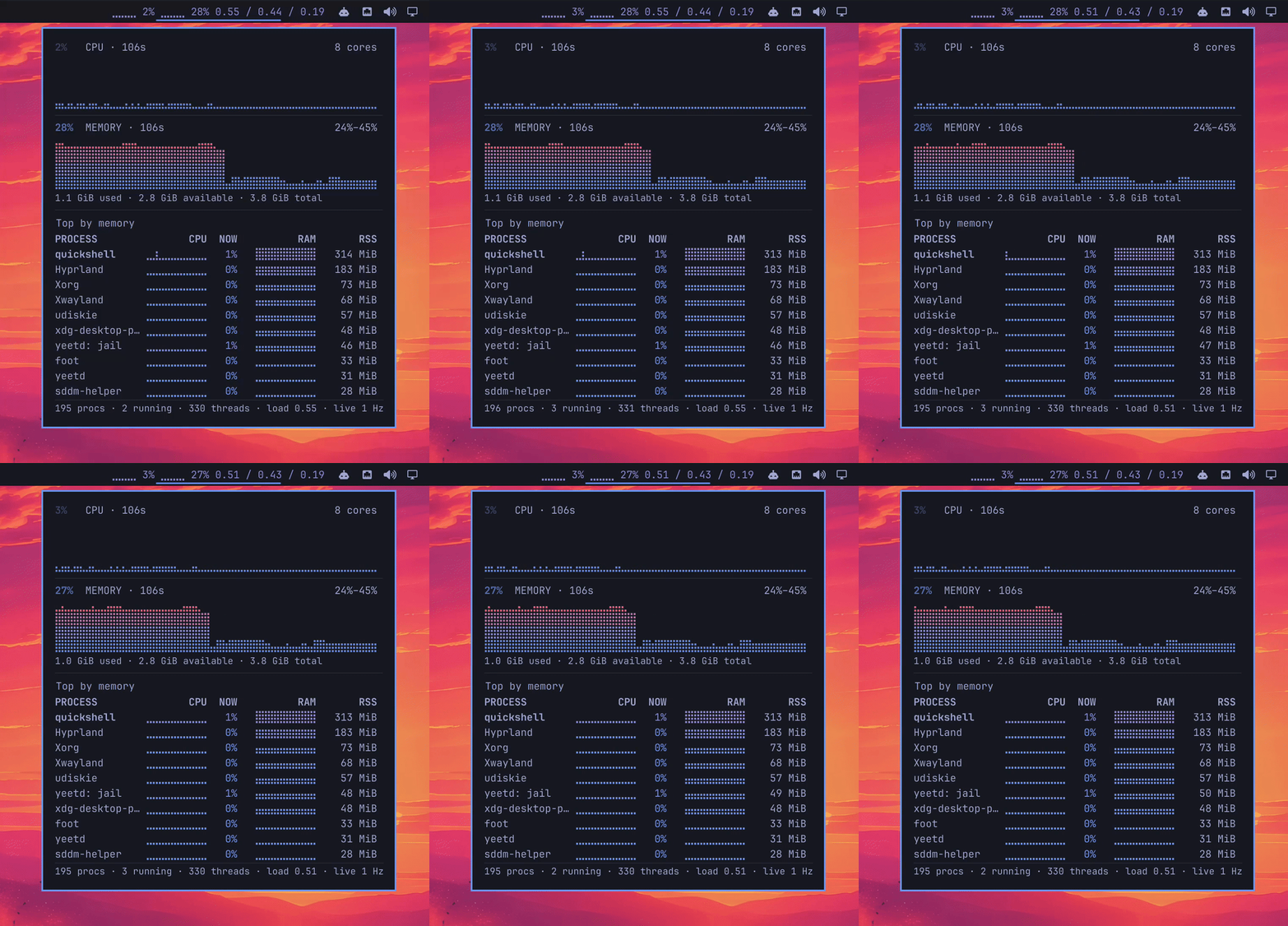
The fastest way to see it on your own bar is to point an agent at it, since every step is omarchy CLI surface and Omarchy symlinks its own agent skill into ~/.claude/skills so an agent on the box picks it up without setup. Paste this at a claude prompt on the box, and note that it deliberately stops before enabling so you can read the code first:
Install the Omarchy plugin at https://github.com/yeet-src/omarchy-proctop.
Clone it with `omarchy plugin add` but do NOT pass --enable. Then show me
what it cloned into ~/.config/omarchy/plugins/cx.yeet.proctop/ and stop so
I can read it before anything loads.
The stop is the part worth keeping. This is the one install where you want to read the code yourself, and an agent under the auto-approving launchers will pass the confirmation prompt for you without pausing. Once you have read the checkout, omarchy plugin enable cx.yeet.proctop turns it on.
The practical advice before you pick a kind is to check whether it already exists. The manual points at omarchyplugins.com as "the community directory of Omarchy shell plugins, and it's the first place to look when you're wondering whether someone has already built the widget you're about to write." Browsing it first is cheaper than discovering a duplicate after you have built one.
How do I test an Omarchy plugin before installing it?
Run omarchy plugin validate ./my-plugin, which the manual describes as running "the same checks the shell does at load time." That is the important part: validation is not a separate linter with its own opinions, it is the actual load-time gate, so a manifest that validates is a manifest the shell will accept. The checks it runs are worth knowing because each maps to a mistake you will make at least once:
- The
schemaVersionis one the shell understands. - The required fields are all present.
- The
idis well formed and not in the reservedomarchy.namespace. - Every entry point is a safe relative path that actually exists on disk.
- There is an entry point for every kind you declared.
- There are no symlinks anywhere inside the folder.
The symlink rule catches people who develop with a Node toolchain, because installing dependencies links a package's binary into node_modules/.bin, and that symlink fails validation. The fix is that build output ships without node_modules, so a clean checkout, which is what a user actually installs, has no symlinks; the failure only ever appears in a working tree you have installed into. Run validate on a clean copy, not your dev tree, to see what the shell will see.
Editing is fast once it is loaded, because "saving a file anywhere under ~/.config/omarchy/plugins/ reloads the plugin code automatically," so the develop loop is to install once, then edit in place and watch changes land without reinstalling.
How do I install an Omarchy plugin from a git repo?
omarchy plugin add <git url>, with --enable if you want it on immediately. The command is deliberately cautious, and understanding the sequence is what lets you install from a URL you have not fully read yet without taking on blind risk. Before it does anything it "tells you plainly that plugins run as arbitrary, unsandboxed code inside your long-lived shell process, shows you the URL, and asks you to confirm." Then it clones into a staging directory, validates the manifest, refuses the install if another plugin already claims that id, and moves it into ~/.config/omarchy/plugins/<id>/.
omarchy plugin add https://github.com/yeet-src/omarchy-proctop --enable
The safety property to internalize is what add does not do: it "never runs anything from the plugin, never executes an install hook, and never asks for sudo. It clones files, checks the manifest, and flips a bit over IPC." So the act of installing a plugin cannot itself compromise your machine; the risk is entirely in enabling code that then runs in your shell. That is why leaving off --enable is a real option and not just caution theater: without it the command "asks whether you want it on now, and you can say no and go read the code first." Install, read the QML and any app.js, then enable.
Managing installed plugins is a small set of verbs. omarchy plugin list prints every plugin with its id, enabled state, whether it is first-party or third-party, its kinds and display name. omarchy plugin update shows a diff before applying, refuses to update over local changes it cannot fast-forward, and rolls back if the new revision fails validation. omarchy plugin remove <id> disables the plugin, then deletes the checkout, with a hand-made non-git folder moved to a timestamped backup rather than deleted outright.
How do I give my Omarchy plugin live system data?
QML draws the widget, but a widget that shows something real needs a source, and the honest constraint is that a bar plugin's QML runs inside the shell process with a limited interface, so the heavy or privileged work belongs in a separate process the widget talks to. This is where the proctop example is a useful pattern rather than just a shape: it is a bar widget backed by a small script that reads live system state and streams it to the QML.
That script is a yeet isolate. proctop runs yeet run app.js under script so it has a terminal, and the widget talks to it over that process's stdin and stdout with no port opened, and the isolate "stops a few seconds after the last bar widget goes away." The data itself comes from the kernel through yeet, a JavaScript runtime for Linux that exposes the running system as a queryable graph. Rather than shelling out to ps on a timer, the plugin subscribes:
// app.js, the plugin's data source
const ticket = await yeet.graph.subscribe(
  "subscription { meminfo(interval_ms: 1000) { mem_total mem_available } }",
  (sample) => emit(sample.data),   // push each tick to the bar widget over stdout
);
// later, when the widget goes away:
yeet.graph.unsubscribe(ticket);
Subscribing rather than polling is the point, and it is a real difference on a bar that redraws every second: yeet.graph.subscribe pushes a new sample when the kernel has one instead of waking a process on a timer, and the sample rate is an argument on the field itself, interval_ms, so proctop drops the heavy per-process query from one second to procs(interval_ms: 4000) while its panel is shut. The privilege stays in the yeet daemon, not in your plugin, and the plugin's own code only ever reads a typed snapshot. The QML side of turning that stream into a chart, and when to reach for QML versus JavaScript, is covered in how to write an Omarchy bar widget in JavaScript instead of QML. What matters for the plugin contract is only that the data source is a separate process with its own lifecycle, not code running inside the shell.
How do I publish and share an Omarchy plugin?
Push it to a public git repo, because that is the entire distribution mechanism. The manual is direct: "Once you've made something you like, put it in a public git repo. That's the whole distribution mechanism, anyone can then run omarchy plugin add against your URL and have it running in seconds." There is no registry to submit to and no review to pass; a plugin is installable the moment its repo is public.
Two things make a published plugin one people actually adopt. List it at omarchyplugins.com, the community directory, so it is discoverable by people browsing rather than only people you tell. And commit the installable files at the repository root so a clone is ready to load with no build step, which is what omarchy plugin add produces and what the shell validates; if your plugin is built from source, the build output belongs at the root and the source can live in a subdirectory. A user who runs add against your URL gets exactly the committed tree, so the committed tree must be the working plugin.
The bottom line: the contract is small, so spend your time on the widget
Making an Omarchy plugin is mostly learning a manifest and three commands, validate, add and remove, and the contract is small on purpose. That leaves your effort for the two things that actually vary: the QML that draws your widget, and the data behind it. Keep the risky and privileged work out of the shell process and in a separate source with its own lifecycle, get the manifest past omarchy plugin validate on a clean checkout, and publish the working tree at the repo root. The rest is the widget you wanted to build in the first place.
Frequently asked questions
What is the minimum for an Omarchy plugin?
A git repository with a manifest.json at its root and at least one QML entry point that the manifest names. The manifest must declare schemaVersion: 1, an id, name, version, one or more kinds, and an entryPoints object. No build step, install script, or framework is required, and omarchy plugin validate confirms the minimum is met before you install.
How do I name an Omarchy plugin id?
Use reverse-DNS of a domain you control, like cx.yeet.proctop, because ids must be unique across all installed plugins and are permanent. The omarchy. prefix is reserved for built-in plugins and cannot be claimed by a third-party plugin. Do not change the id after release, since the shell uses it to track enabled state and to find the plugin for updates and removal.
Does omarchy plugin add run code from the plugin?
No. The manual states omarchy plugin add "never runs anything from the plugin, never executes an install hook, and never asks for sudo." It clones the files, validates the manifest, and moves the checkout into place. Risk begins only when you enable the plugin, because then its code runs inside your shell process, which is why you can install without --enable and read the code first.
Where are Omarchy plugins installed?
Third-party plugins you add live in ~/.config/omarchy/plugins/<id>/, while the built-ins that ship with Omarchy live under the Omarchy install path. Both are discovered the same way at startup. Enabled state is stored separately in ~/.config/omarchy/shell.json, so removing a plugin's entry there disables it without deleting the files.
Do I need yeet to write an Omarchy plugin?
No. A plugin needs only a manifest and QML, and many plugins are pure QML with no external data. You need something like yeet only when your plugin has to show live system data, CPU, memory, processes, network, that QML inside the shell cannot safely gather itself. In that case the data comes from a separate process, and yeet is a convenient one because it exposes the running system as a subscribable graph and keeps the privilege in its own daemon rather than in your plugin.
Sources
- Omarchy manual, shell plugins chapter, on the manifest fields, the plugin kinds,
omarchy plugin validate, the install flow, the unsandboxed-code warning, and public-repo distribution. https://github.com/basecamp/omarchy/blob/master/manual/32-shell-plugins.md - omarchy-proctop, a working bar-widget plugin used as the example, including its
manifest.json, entry points, and the yeet-backed data source. https://github.com/yeet-src/omarchy-proctop - omarchyplugins.com, the community directory of Omarchy shell plugins. https://omarchyplugins.com
Related resources
- How to write an Omarchy bar widget in JavaScript instead of QML, the widget and data-source craft this post leaves out. https://yeet.cx/topical-takes/how-to-write-an-omarchy-bar-widget-in-javascript-instead-of-qml
- Claude Code on Omarchy, setup and permissions for running an AI agent on an Omarchy box, including installing a plugin safely. https://yeet.cx/topical-takes/claude-code-on-omarchy
- yeet documentation, the runtime behind the live data source, exposing the running system as a queryable graph. https://yeet.cx/docs/